by Jobuza Team | Jan 19, 2026 | BLOG, PAN/Aadhar Card Updates, Trending News
Imagine Losing Money Without an OTP or PIN
Imagine waking up to find money missing from your bank account—even though you never shared an OTP, PIN, or password. This is exactly how the AEPS Aadhaar scam works. The fraud mainly affects people in rural and semi-urban areas, where Aadhaar-linked banking services are widely used.
How Does the Aadhaar (AEPS) Fraud Work?
Fraudsters begin by illegally obtaining Aadhaar details and biometric data, such as fingerprints. This information often comes from leaked databases or unsafe data handling at unauthorised centres.
Using this stolen data, scammers create fake fingerprints and use them on AEPS-enabled micro-ATMs. Since AEPS transactions rely on Aadhaar number and biometric verification, money can be withdrawn without any OTP or PIN—making it appear as if the account holder authorised the transaction.
Aadhaar Scam and the Role of Mule Accounts
Once the money is withdrawn, it doesn’t go directly to the fraudsters. Instead, it is routed through mule accounts. These are bank accounts that are either rented, sold, or compromised and then used to move stolen funds.
By transferring money through multiple mule accounts, scammers make it extremely difficult for authorities to trace the final destination or identify the real criminals behind the fraud.
How GPS-Enabled Devices Can Help Prevent AEPS Fraud
Security experts believe that GPS-enabled micro-ATMs can significantly reduce AEPS fraud. With this system, transactions are allowed only from the registered location of the device. If a transaction is attempted from a different location, it automatically fails.
This approach not only protects customers but also helps banks detect high-risk areas and prevent large-scale fraud more effectively.
The Future of Aadhaar Security
In the coming years, AEPS devices are expected to become even more secure. Technologies like AI-based fraud detection and biometric liveness checks can help ensure that only real, live fingerprints are accepted.
Importantly, these systems track the location of the machine, not the individual, ensuring better security without compromising personal privacy.
Aadhaar Scam: How Can You Protect Yourself?
Awareness is your strongest defence against Aadhaar-related fraud.
Lock your Aadhaar number and biometrics through the official UIDAI website whenever they are not in use. Avoid updating your Aadhaar at unknown or unofficial centres. When sharing a photocopy of your Aadhaar card, always make it from the physical card and clearly mention the purpose. If you share a digital copy, delete it immediately after use.
By staying alert and following basic safety practices, you can greatly reduce the risk of falling victim to AEPS and Aadhaar scams.
Read More PAN/Aadhar Card Updates
by Jobuza Team | Jan 5, 2026 | BLOG, PAN/Aadhar Card Updates, Trending News
Today, the Aadhaar card is no longer limited to being just an identity document. It has become a digital identity that is linked to almost every important service in our daily lives. From opening bank accounts and getting mobile SIM cards to receiving pensions, rations, and benefits under government schemes, Aadhaar is used everywhere.
However, an important question arises — do you know where and for what purpose your Aadhaar card has been used so far? If your answer is no, there is no need to worry. You can now easily check your Aadhaar usage details in just a few minutes.
Why Tracking Aadhaar Usage Is Important
In recent times, cases of Aadhaar-related fraud have increased rapidly. Many people are unaware that their Aadhaar number is being misused without their knowledge. Fake SIM cards are issued, loans are taken fraudulently, and government benefits are misused in someone else’s name.
By regularly checking your Aadhaar authentication history, you can detect such misuse at an early stage and prevent financial loss, legal trouble, and identity theft. This makes Aadhaar usage tracking extremely important in today’s digital environment.
Tracking Aadhaar Usage Is Now Easier Than Ever
Earlier, users had to visit the UIDAI website or use the mAadhaar app to access Aadhaar details, which many people found complicated. To simplify this process, the government has now introduced a new Aadhaar app.
With this app, you can easily check when, where, and for what purpose your Aadhaar was used, directly from your mobile phone while sitting at home.
How to Check Aadhaar Authentication History
To view your Aadhaar usage history, start by downloading the new Aadhaar app on your smartphone. After installing the app, log in using your Aadhaar number and the mobile number registered with Aadhaar.
Once logged in, go to the “Authentication History” or “Auth History” section. Here, you will find a complete list showing the date, time, and location of every Aadhaar authentication. This information helps you verify whether the usage was genuine or suspicious.
What to Do If You Notice Any Misuse
If you find any Aadhaar usage entry that you do not recognize or that seems suspicious, do not ignore it. Immediately report the issue to the UIDAI helpline. You can also file a complaint through the cybercrime helpline or contact your nearest police station.
Timely reporting can protect you from fraudulent loans, cyber fraud, and unnecessary legal complications.
Stay Alert and Stay Safe
In the digital age, even a small mistake can result in major losses. Fraudsters continuously look for new ways to misuse Aadhaar details. That is why checking your Aadhaar authentication history regularly is a smart and responsible habit.
The new Aadhaar app makes this process simple and quick. Staying informed and alert is the best way to protect your digital identity.
Disclaimer
This content has been sourced and edited from TV9. While modifications have been made for clarity and readability, the original content belongs to its respective authors and website. We do not claim ownership of the original content.
Read More PAN/Aadhar Card Updates
by Jobuza Team | Dec 24, 2025 | BLOG, PAN/Aadhar Card Updates, Trending News
Today, the Aadhaar card is no longer limited to being just an identity proof. It has become an essential part of our digital identity. From opening bank accounts and getting mobile SIM cards to receiving pensions, ration benefits, and accessing government schemes, Aadhaar is used almost everywhere. However, an important question remains: do you know where and for what purpose your Aadhaar card has been used so far?
If you are unsure, there is no need to worry. The government now provides an easy way to track Aadhaar usage and stay protected from misuse.
Why Tracking Aadhaar Usage Is Important
In recent years, Aadhaar-related fraud cases have increased significantly. Many people become victims without even realizing it. In some cases, fake SIM cards are issued using someone else’s Aadhaar details. In others, fraudulent loans are taken or government benefits are wrongly claimed.
By checking your Aadhaar authentication history on time, you can detect such misuse early and prevent financial loss, legal trouble, and identity theft. This is why monitoring Aadhaar usage has become extremely important for every Aadhaar holder.
Aadhaar Usage Tracking Is Now Easier Than Ever
Earlier, checking Aadhaar usage required visiting the UIDAI website or using the mAadhaar app, which many users found confusing. To simplify the process, the government has now introduced a new Aadhaar app.
With this new app, you can easily check when, where, and for what purpose your Aadhaar was used, all from your mobile phone at home. The interface is user-friendly and designed to help even first-time users.
How to Check Aadhaar Authentication History
To view your complete Aadhaar usage history, start by downloading the new Aadhaar app on your smartphone. After installation, log in using your Aadhaar number and the mobile number registered with UIDAI.
Once logged in, look for the option called “Authentication History” or “Auth History.” Clicking on this option will show a detailed list of Aadhaar usage records. You will be able to see the date, time, and location of each authentication. This helps you identify whether the usage was genuine or suspicious.
What to Do If You Notice Aadhaar Misuse
If you find any Aadhaar usage entry that you do not recognize, do not ignore it. Immediately report the issue to the UIDAI helpline. You should also consider filing a complaint with the cybercrime helpline or your nearest police station.
Taking timely action can protect you from fraudulent loans, cyber fraud, and future legal complications. The sooner you report misuse, the better your chances of preventing further damage.
Stay Alert and Stay Safe
In today’s digital world, even small negligence can lead to serious consequences. Fraudsters are constantly finding new ways to misuse Aadhaar information. This makes it essential to regularly check your Aadhaar authentication history.
The new Aadhaar app makes this process quick and simple. Staying informed and alert is the best way to protect your identity and personal data.
Read More PAN/Aadhar Card Updates

by Jobuza Team | Dec 16, 2025 | BLOG, PAN/Aadhar Card Updates, Trending News
Living in India requires several official documents for daily use, and the Aadhaar card is one of the most important among them. It is needed for school and college admissions, address verification, banking services, and access to government schemes. Because of this, even small updates in Aadhaar rules directly affect people’s everyday lives.
Many people need to update their Aadhaar details from time to time. Earlier, most changes required visiting an Aadhaar enrolment centre, standing in long queues, and submitting documents. Now, this process has become much easier. Certain updates can be done from home without paperwork or physical visits.
Mobile Number Update Made Easy
The mobile number linked to Aadhaar plays a crucial role in identity verification. OTP-based authentication is required for banking, online services, and government portals. If your mobile number is not linked or your old number is inactive, many services stop working.
Earlier, updating a mobile number meant visiting an Aadhaar centre, filling out forms, waiting for your turn, and paying a fee. UIDAI has now introduced a new feature to remove this inconvenience and make the update process much simpler.
Aadhaar Mobile Number Update From Home
With the new system, you no longer need to visit an Aadhaar centre to change your mobile number. The entire process can be completed online in just a few minutes.
The update will be done using:
The system matches your live face scan with Aadhaar records and approves the request. No documents are required, and there is no need to stand in queues or submit physical forms.
This change is especially helpful for senior citizens, working professionals, and people living in remote areas who earlier had to travel long distances for a simple update.
Official Aadhaar App to Be Used
To use this feature, you need to download the official Aadhaar app.
Once installed, the app will guide you step by step through the mobile number update process from the comfort of your home.
Why This Update Matters
This new rule reduces dependency on Aadhaar centres, saves time, and improves user convenience. It also strengthens digital verification while keeping the process simple and secure for citizens.
Read More PAN/Aadhar Card Updates

by Jobuza Team | Dec 16, 2025 | BLOG, PAN/Aadhar Card Updates, Trending News
Whenever you check into a hotel, attend an event, or join an institution, you are often asked to submit a photocopy of your Aadhaar card. This photocopy contains sensitive personal details such as your name, address, and date of birth, which are then stored by hotels, event organisers, or other entities.
Under the Aadhaar Act, storing or misusing Aadhaar data without authorisation is illegal. To curb this practice and prevent misuse of personal information, the Unique Identification Authority of India (UIDAI) is introducing a new rule related to Aadhaar verification.
UIDAI to Ban Physical Storage of Aadhaar Photocopies
UIDAI CEO Bhuvnesh Kumar has confirmed that a new regulation will soon be notified. Under this rule, hotels, event organisers, and other institutions will no longer be allowed to take or store physical photocopies of Aadhaar cards.
The authority has approved this regulation to ensure that Aadhaar data is not misused or leaked and that individuals’ privacy is protected.
What Is the New Aadhaar Verification Rule?
According to UIDAI officials, institutions that require Aadhaar-based verification will now need to register themselves with UIDAI.
Once registered, these entities will gain access to a new Aadhaar verification technology. Instead of collecting photocopies, verification will be done through:
This will eliminate the need for physical documents and reduce the risk of data misuse.
Aadhaar App-to-App Verification Explained
The upcoming Aadhaar app will enable secure offline verification. With app-to-app verification:
-
Aadhaar data will not be shared or stored by hotels or organisers
-
Verification will happen digitally and instantly
-
There will be no dependency on photocopies or paper documents
This method also solves the issue of intermediary server downtime, which often disrupts Aadhaar authentication through existing systems.
Aadhaar Verification Through API Access
Institutions that need offline Aadhaar verification will be provided access to an API (Application Programming Interface).
Using this API, hotels and organisers can update their systems to verify Aadhaar securely without accessing or storing personal data. This ensures compliance with UIDAI rules and data protection laws.
Timeline for Full Implementation
The new Aadhaar app and verification system are expected to be fully aligned with the Digital Personal Data Protection Act.
According to UIDAI:
Why This Aadhaar Rule Is Important
This move is aimed at:
-
Preventing misuse of Aadhaar data
-
Protecting citizens’ privacy
-
Eliminating unnecessary photocopies
-
Making verification faster and more secure
Once implemented, hotels and event organisers will no longer be allowed to demand Aadhaar photocopies from customers.
Read More PAN/Aadhar Card Updates
by Jobuza Team | Nov 25, 2025 | BLOG, PAN/Aadhar Card Updates, Trending News
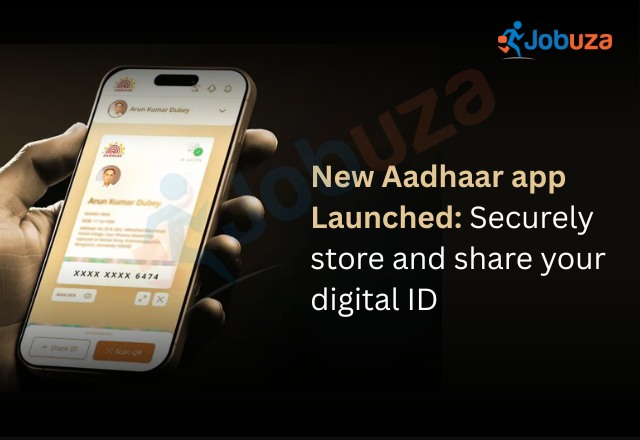
The UIDAI has launched a new Aadhaar app on November 9, designed to make storing and sharing your Aadhaar card easier and more secure. Available on both Google Play and the App Store, the app works alongside the mAadhaar app and provides a simple way to keep a digital copy of your Aadhaar for quick verification and paperless transactions. With this app, you no longer need to carry physical photocopies or cards during services that require identity proof.
Features of the New Aadhaar App
The new Aadhaar app complements the existing mAadhaar app but does not replace it. While it does not include features such as downloading a digital card, ordering a PVC Aadhaar, or verifying your email and mobile number, it focuses on secure storage and easy sharing of your Aadhaar details.
The app offers a clean, user-friendly interface with a quick two-step process to access your Aadhaar information. It enhances convenience by allowing citizens to carry and share Aadhaar details directly from their phones, similar to options like PDF downloads or Digilocker.
One of the key highlights is the ability to store up to five Aadhaar profiles on the same device, as long as they are linked to the same mobile number. This makes it ideal for families who want to manage multiple Aadhaar cards in one place.
The app also supports biometric locking, allowing users to protect their Aadhaar data until they decide to unlock it. Profile information automatically updates after any successful change. You can securely share verifiable details and QR codes, and even scan Aadhaar QR codes for faster and smoother verification.
How to Set Up the New Aadhaar App
To start using the new Aadhaar app, download and install it from the Google Play Store or Apple App Store. Choose your preferred language and enter your 12-digit Aadhaar number. Send an SMS from your registered mobile number when prompted. After entering the OTP, complete face authentication and set a six-digit password. Your Aadhaar card will then appear in the app, where you can mask your number, share details, or enable biometric lock.
You can repeat the same process to add up to four more Aadhaar profiles on the same device, making the app a convenient option for managing multiple Aadhaar cards securely.
Click here for more – PAN/Aadhar Card Updates